


If you have currently become the victim of an Instagram shadowban and want to know how to remove Instagram Shadowban issue then you are at the correct place.
In this specific post, you are going to learn everything that you should know about Instagram Shadowban.
So, without much delay, let’s get started…
What Is An Instagram Shadowban?
Shadowbanning states to block the social media content of any user without their knowledge. It means if you have shadowbanned on an Instagram then you won’t even know that you have been hit.
Moreover, your posts will not show in anyone’s news feeds on Instagram until and unless they follow you. In case, if your Instagram followers re-gram your content then those pictures will also consider shadowban.
In simple words, we can say that an Instagram shadow ban refers to a platform restricting your posts reach by limiting visibility. The main “indicator” of the shadowban is all your hashtagged posts are only appearing to your followers but not on Explore pages.
Before knowing how to remove shadowban Instagram, let’s know if you’re actually shadowbanned on Instagram or not…
How To Know If You’re Shadowbanned On Instagram?
There is no straightforward way to know if you’re shadowbanned on Instagram. But below I have stated a few tests that you can run to know if you’re shadowbanned.
1. Check Your Posts
All you need to do is to go through all your previously posted Instagram posts. And need to check whether your content is showing along with hashtags or not. If it does not then you might need to look a little deeper.
2. Review Your Insights Data On Instagram
If you are suddenly noticing an enormous drop in the impressions engagement outer of your follower then there’s a possibility you have been shadowbanned.
3. Check Your Hashtags
It is one of the easiest ways to know if you’re shadowbanned on Instagram. Yes, if you will see a message below the hashtag or caption of your Instagram post then maybe you are shadowbanned due to putting excess hashtags on your posts.
Why User Get Shadowbanned On Instagram?
As Instagram has already mentioned in their community guidelines that not to upload any sort of “sexual content” which violates their community guidelines.
Though, if you are uploading such types of content even after knowing the guidelines then you might be shadowbanned on Instagram.
Well, below we have listed some of the major scenarios that can shadowbanned you on Instagram.
- Posting content which is not genuinely yours (like “copied someone’s post”)
- Posting nudity.
- You are using broken or banned hashtags.
- Harassment, threats/hate speech.
- Posting the content which glorifies a violation of the law.
- Glorifying graphic violence or self-injury.
Way 1: Back-off From The Posting
As soon as you come to know that you are shadowbanned on Instagram firstly, you need to stop new postings for 3-5 days.
Doing this will reduce the chances to ban your Instagram account permanently. On the other hand, we can say, this method almost works as a “reset” for your Instagram account.
Way 2: Delete Hashtags From All Your Recent Instagram Posts
Once you have shadowbanned on Instagram, you have to first stop posting new content as said in the way #1. Secondly, you have to delete hashtags (#) from all your recent Instagram posts.
There is a huge chance that due to “hashtag glitch” you’re shadowbanned on Instagram. It means some of the hashtags words are actually banned or blocked by Instagram and using such inappropriate hashtags can terminate or shadowban you.
Way 3: Don’t Break The Instagram’s Rules
Before using any social media applications it has been always recommended to once go through their guidelines.
How To Remove Instagram Shadowban On Android?
If you want to know how to get rid of shadowban Instagram, apply the effective ways mentioned below:
Way 1: Back-off From The Posting
As soon as you come to know that you are shadowbanned on Instagram firstly, you need to stop new postings for 3-5 days.
Doing this will reduce the chances to ban your Instagram account permanently. On the other hand, we can say, this method almost works as a “reset” for your Instagram account.
Way 2: Delete Hashtags From All Your Recent Instagram Posts
Once you have shadowbanned on Instagram, you have to first stop posting new content as said in the way #1. Secondly, you have to delete hashtags (#) from all your recent Instagram posts.
There is a huge chance that due to “hashtag glitch” you’re shadowbanned on Instagram. It means some of the hashtags words are actually banned or blocked by Instagram and using such inappropriate hashtags can terminate or shadowban you.
Way 3: Don’t Break The Instagram’s Rules
Before using any social media applications it has been always recommended to once go through their guidelines.
Way 1: Back-off From The Posting
As soon as you come to know that you are shadowbanned on Instagram firstly, you need to stop new postings for 3-5 days.
Doing this will reduce the chances to ban your Instagram account permanently. On the other hand, we can say, this method almost works as a “reset” for your Instagram account.
Way 2: Delete Hashtags From All Your Recent Instagram Posts
Once you have shadowbanned on Instagram, you have to first stop posting new content as said in the way #1. Secondly, you have to delete hashtags (#) from all your recent Instagram posts.
There is a huge chance that due to “hashtag glitch” you’re shadowbanned on Instagram. It means some of the hashtags words are actually banned or blocked by Instagram and using such inappropriate hashtags can terminate or shadowban you.
Way 3: Don’t Break The Instagram’s Rules
Before using any social media applications it has been always recommended to once go through their guidelines.
It is one of the simplest ways that anyone can try without any tech skills. Thus, you have to change your business profile to personal for a few days in order to see if this will assist you to eliminate yourself from Shadowbanned.
Way 7: Stop Using Instagram For A Few Days
Avoiding using the Instagram app is the most effective way that helped many Instagram shadowbanned victims. So, you have to also stop using your Instagram account for a few days for a fresh start!
But remember that when you’ll come back again to use your app, proceed with Instagram community guidelines.
Way 8: Contact Instagram Support
If none of the above ways worked for you to solve how to get out of being shadowbanned on Instagram then the last option left for you is to contact Instagram support.
Though is really hard of getting a reply from them. But once you can try it.
Here are the 2 ways to contact the Instagram support:
#1: Report A Problem Through Instagram App:
Reporting a problem through an Instagram app is the most recommended method. Many users have found this approach helpful in their cases. A few persons have been unbanned just after they’ve reported the problem.
Follow the below steps to report the problem to Instagram support team:
- Firstly, open Instagram Settings
- Choose the Help option >> “Report the Problem”
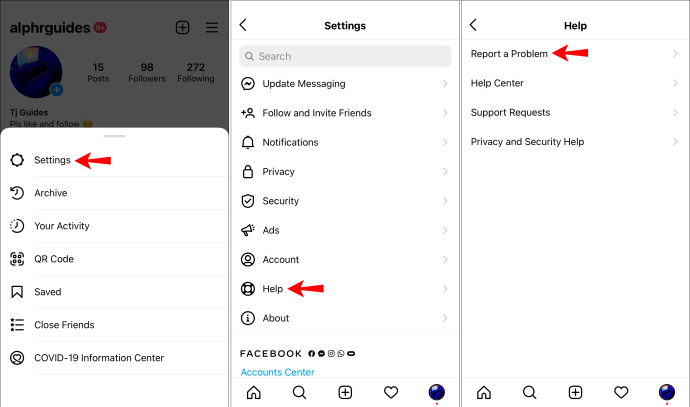
- Next, again choose “Report the Problem”.
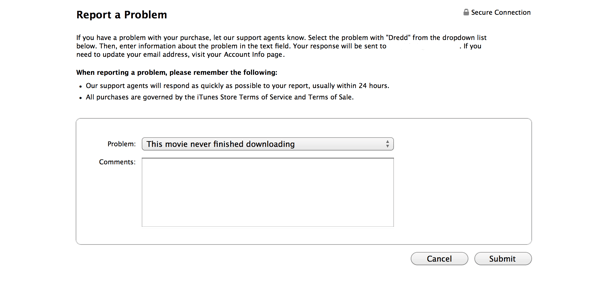
- There, you have to write about the recent problem that you are getting.
#2: Report A Problem Directly To An Instagram Mail ID:
There is another effective option that can try is to contact the Instagram support team via Gmail. All you need to do is to send the email at the mail ID- support@instagram.com.
Frequently Asked Questions:
Is An Instagram Shadowban Permanent?
The answer is no, an Instagram shadowban is not a permanent issue. As it happens due to various unknown reasons and users can easily get rid of it by applying the below mentioned tricks:
- Stop any action which goes against the terms of a service
- Avoid using restricted or banned hashtags
- Evade getting reported
- Contact to Instagram support
- Take a break from the Instagram
- Do not act like a bot.
How Long Does A Shadowban Last On Instagram?
A shadowban last on Instagram generally for 14 days. Hence, if you stop further action which goes against the terms of a service then you can use your Instagram account again after 14 days without any restrictions.
Why Is Instagram Shadow Banning?
The foremost reason behind the shadow banning on Instagram is using too many hashtags. If you’re using inappropriate hashtags in all of your posts to increase more visibility then it is possible that you can shadowban.

0 Comments:
Post a Comment